
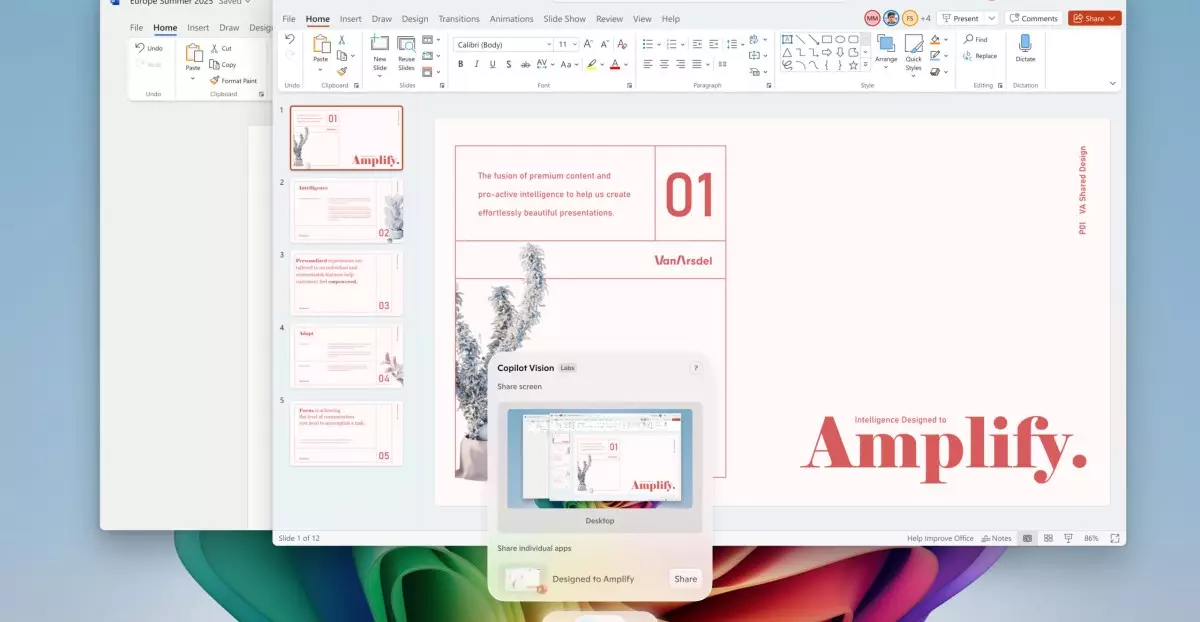
Microsoft’s latest updates to Windows 11 mark an ambitious stride toward integrating artificial intelligence into everyday computing. The introduction of the Copilot Vision feature signifies not merely a technological enhancement but a transformative shift in how users perceive and interact with their devices. By enabling the AI to analyze everything on your screen, Microsoft positions itself at the forefront of intelligent operating systems—an era where machines don’t just respond to commands but proactively understand and assist with human tasks.
This functionality’s power lies in its ability to bridge the gap between static content and dynamic user needs. Imagine unfolding a complex webpage or a multi-application workspace, and instead of manually sifting through information, your AI assistant provides instant insights — answering questions aloud, suggesting improvements, or guiding you through complicated procedures. Such capabilities elevate productivity and shift the user experience from passive to actively engaged. Moreover, the AI’s ability to interpret visual and textual information across various apps represents a significant leap forward, making Windows 11 a smarter, more intuitive environment.
Exclusive Features for Power Users and Tech Enthusiasts
While Microsoft has democratized access to some AI tools, its true innovation appears to be reserved for the more advanced or privileged segments—specifically those with Copilot Plus PCs. Snapdragon-powered devices enjoy a suite of AI-powered enhancements, ranging from setting adjustments via natural language to advanced image editing. The agent integrated into Settings signifies a shift toward conversational computing, simplifying tasks like enabling quiet hours or connecting Bluetooth devices with mere voice commands.
What makes these upgrades more compelling is their context-specific application. For instance, the “Click to Do” feature offers a remarkably hands-free way to interact with content. Holding down the Windows key and clicking on various elements unleashes an array of intelligent actions—such as summarizing information, practicing language skills with Reading Coach, or even drafting documents. These functionalities reveal Microsoft’s foresight in making routine operations not just easier but more human-centered. It reflects an understanding that the future of productivity tools hinges on natural language and AI-driven automation rather than static commands.
Creativity and Precision Enhanced Through AI
Microsoft’s focus on enhancing creative tools embodies a compelling narrative—AI isn’t just about utility; it’s about redefining artistic expression and visual manipulation. The new AI-powered sticker generator and object select tools in Paint showcase this vision vividly. Artists, designers, and casual users alike will find these features potent: effortlessly generating creative assets and editing images with pinpoint accuracy.
Additionally, AI lighting adjustments in Photos and the “perfect screenshot” tool within the Snipping Tool signal a move toward automated perfection. These features aim to reduce the cognitive load, allowing users to focus on creative or analytical tasks without distraction. The AI’s ability to optimize images or precisely capture content demonstrates an appreciation for how users value quality and efficiency simultaneously.
Balancing AI Expansion and User Control
Despite the excitement surrounding these substantial upgrades, they raise important questions about user agency and privacy. Microsoft’s rollout strategy, providing some features to all Windows 11 PCs while reserving others for premium hardware, indicates an uneven landscape of access. This tiered approach may perpetuate disparities between tech users, incentivizing hardware upgrades and potentially fragmenting user experiences.
Moreover, reliance on AI to automatically fix issues or perform tasks prompts concerns about over-automation. While convenience is invaluable, always-on intelligent features necessitate transparency, user control, and security safeguards. The risk of overestimating AI’s reliability must be addressed to prevent frustration or misuse. Microsoft’s challenge will be to strike a balance—offering powerful AI tools without sacrificing user trust or autonomy.
Microsoft’s bold push into AI-infused Windows 11 signifies a narrative shift in personal computing—it’s about empowerment, creativity, and efficiency. These features promise a future where devices are more attuned to human needs, capable of interpreting complex visual and textual data, and assisting in ways previously unimaginable. Yet, as with all technological revolutions, critical oversight remains essential. Ensuring equitable access, safeguarding privacy, and maintaining user control will determine whether this AI-driven vision becomes a boon or a burden. Regardless, Microsoft’s current trajectory undeniably positions Windows 11 as a pioneering platform—one that could redefine our relationship with technology for years to come.
Leave a Reply